 Explore our Christmas Collection

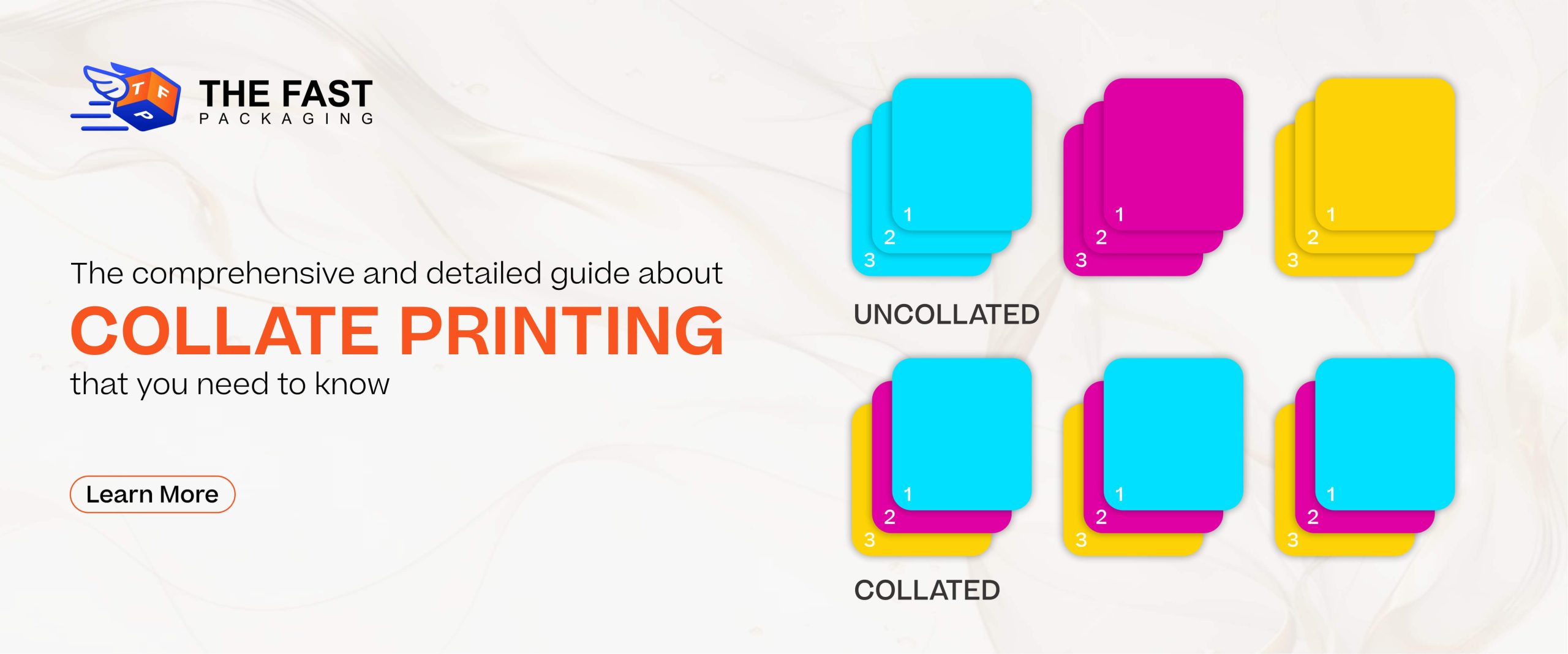
Collate printing is a key feature that is used for organizing multi-page documents efficiently, and it is especially used for high-volume or professional print jobs. So, if you want your multi-page documents to stay in order, then you are ready to use this feature for personal, business, and professional purposes.
In this guide, you will know everything from what “collate” means to its benefits and uses. This article also covers facts about how collated printing compares to uncollated printing. You can also use the collate feature of printing for custom mailer boxes. So, let’s know about this essential printing technique.
There are several options available when it comes to printing multiple documents. And out of all techniques, one amazing printing setting is “collate”. Now you must think about the meaning of “Collate”? You need to know what the benefits and popular examples of collation are.
Here in this article, you will discover why people search for “collate meaning printer”.
It is found that people search for “collate meaning printer” on the search engines. So, first of all, you need to know about the amazing feature of the printing process that is “collate,” as it refers to the arrangement of printed pages into a specific sequence and order. In this printing technique, collating is used to assemble the papers in the correct order, rather than in a stack. This printing feature is used for booklets, reports, catalogues, or manuals.
So, if you want to print 100 copies of your documents in sequential order, numbered 1-25, then this feature allows you to print one copy of your documents from 1-25, then the second copy from 1-25, and so on. This would reduce the hassle of arranging documents.
Before this printing technique, pages had to be sorted manually. So, it is a hectic task, but the collating makes it no longer difficult. The advent of this printing software has made it easy to print multiple pages. So, this eliminates the need to manually sort and organize pages after printing, saving time and effort.

A few other amazing benefits of collating
We observe that manual arrangements sometimes comes with errors like wrong sequence and arrangements get mixed.
However, collating removes all these errors and makes the printed papers ready for use immediately after printing. The reason is that the documents are already arranged in the right order.
Collate printing enhances the business workflow by saving human effort and time. By using this printing feature, you can achieve accuracy when printing a multipage document.
When you arrange a large number of documents, the chances of human error increase, such as wrong order and mixing. But the collate helps to print the document in sequence without any human interaction. So, the risk of misplacing and mixing documents becomes very low.
In addition to this, you also do not require human efforts to recheck the order of documents, and these prints are just ready to use.
It is obvious that everyone wants to print their documents in the right order, so it is a useful technique for printing multiple pages. Here are some of the most common use cases and examples of collate printing:

Collated printing automatically outputs each set in the correct order without human interaction.
For seamless delivery and effective communication, this feature helps to ensure each set of slides is sorted and arranged.
The sequence of pages is important for the right understanding of manuals and guides, and it delivers such a sequence.
It improves the understanding by ensuring that information is printed correctly or in an organized manner.
It is important to know the difference between collated printing and uncollated printing, as it helps users to choose the right option.
Basically, the collated printing is a technique in which the printing of documents is done in a sequence or ordered sets. So, when you choose to collate, the printer automatically arranges the pages of a multi-page document into complete sets.
Here is an example of collated printing if you are printing five copies of a 10-page report, then the output will come out as:
And so on, that is the reason this method is considered ideal for materials that need to be handed out, bound, or presented without further sorting. Collated printing ensures efficiency, accuracy, and professionalism for printing the reports, manuals, proposals, and multi-page forms. You can use collate printing for coffee boxes also it will help you to create a perfect sequence.
When you go for uncollated or non-collated printing, the printer prints each page in bulk before moving on to the next page.
Here is the same 10-page document example, so if you print five copies uncollated, you will get the outputs:
And so on until page 10, which means the uncollated printing is typically used when pages do not need to stay in order. It can be helpful for flyers, handouts, single-page inserts, or when collating will be done manually.
The technologies make our day-to-day tasks easy, as collating your document and projects could be as easy as clicking a button, “Collate” on your advanced multifunction printer.
Contrary to this, when you want to change the stock within your documents, you want to start with separate print runs. And then you need to manually collate your pages.
Manual collating offers greater control for custom or complex print jobs. And it is also needed where automation cannot handle variations. A few examples are:
Manual collating is required when combining pages with full-bleed designs and standard margins, as it is required to ensure proper trimming and alignment during finishing.
When printing documents with varying paper sizes, such as A4 with A5 inserts, collating by hand helps maintain the correct sequence and layout.
In this discussion, we will guide you on how to enable and disable the collate printing option, as it depends on the printing software and operating system.
Firstly, you need to access the print settings, where you can find the collate option. In case you do not find the collate option, then check the user manual of your printer.
So, if you are looking for a packaging partner who can print customized documents with high-tech printing, then “The Fast Packaging” is here.
As discussed above, collation in printing saves time and human effort, and also ensures that multi-page documents are organized in the correct order. This information also lets you know about “Collate meaning printer”. You will also understand when and how to use collate printing, reduce errors, and elevate the quality of every printed project.
Assembling of documents into proper order is called collation.
Collating in printing means the process of arranging multi-page documents or reports in a specific, sequential order. For instance, printing pages 1 to 10 in a complete set before starting the next copy.
Collated printing organizes your pages into ordered sets, such as pages 1–10. In contrast, uncollated printing outputs all copies of each page first, requiring manual sorting for all.
Yes, most printers allow you to enable or disable collating through the print dialog box. Simply check or uncheck the “Collate” option before printing your document.
Not necessarily; however, the collated printing and double-sided printing are two separate settings. Collating controls the page order,